Restore and Renew: blending science, UX and creative design to drive ecological impact
Restore and Renew: a climate-resilient digital tool for ecological restoration
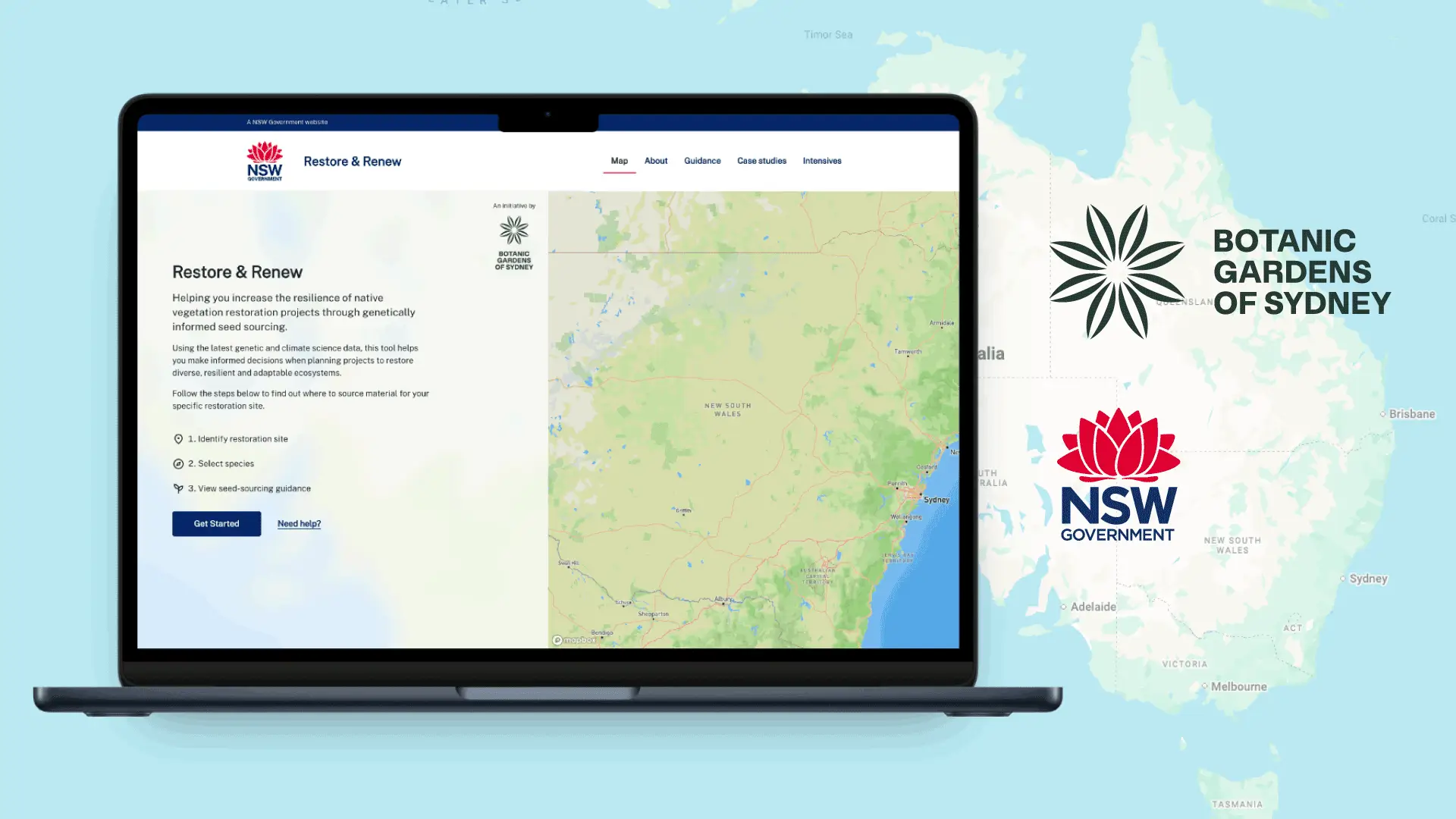
Restore and Renew is a joint initiative between the Botanic Gardens Sydney (BGS) and AdaptNSW, aimed at helping restoration professionals and researchers make climate-resilient planting decisions. By combining cutting-edge genetic and climate data, the project sought to equip users with an intuitive digital tool to visualise complex environmental information, identify your target site, and find out where you can source seed to maximise the genetic diversity and climate-readiness of your restoration project.
Sitback was initially brought in to apply NSW Government branding and conduct a light UX review of existing designs for the new tool. But during the first workshop, it became clear that the client had a different vision. The original designs were shelved, and Sitback was asked to lead the creative redesign and build of a more advanced, user-centred solution.
Designing a high-performance UX for complex climate and genetic data
Two major challenges shaped the course of the project:
- Balancing structure with flexibility
The NSW Digital Design System (DDS) didn’t provide the flexibility needed to create the interactive, data-heavy interface the project required. The vision included map overlays, dynamic forms, and full-screen mobile interactions — all of which sat outside the capabilities of standard DDS components. - Performance bottlenecks
The existing backend — built on an R model with older geospatial libraries — buckled under the weight of complex environmental datasets when the climate and species data were combined. Queries took up to 37 seconds to load, resulting in a sluggish, unreliable user experience.
A user-centred design and technology solution for scientific decision-making
A UX-led design process grounded in real user behaviour
The project’s success hinged on bringing together user-centred design with performance optimisation. Sitback’s UX and Creative teams translated the client’s rough sketches into a refined, responsive interface.
Extending the NSW Digital Design System through a brand exemption
While accessibility and consistency with NSW government standards remained essential, the DDS simply couldn’t support the needs of this tool in its off-the-shelf form. At Sitback’s recommendation, the client successfully applied for a brand exemption, which allowed for selective deviation while maintaining core compliance.
This opened the door to:
- A 50/50 split-screen layout — ideal for side-by-side map interaction and data input.
- Custom components for species selection, climate filters, and dynamic overlays.
- Immersive, full-screen map views and draggable show/hide cards for improved mobile UX.
- A UI that retained visual familiarity with NSW standards, while meeting the complex needs of this project’s scientific audience.
Accessibility was never compromised. Designs were tested across devices, including older models like iPhone 5, and common interaction patterns like pullable cards and toggles were employed to utilise space effectively while ensuring inclusivity. Text-based cues complemented ambiguous visual icons, and content was structured to support screen readers and keyboard navigation.
Translating complex science into clear, step-by-step user journeys
- Interactive Figma prototypes were developed with full animations, state changes and map overlays to simulate the real tool. These were used in usability testing and stakeholder demos to iterate quickly before build.
- Sequential page design broke down the complex data input process into a digestible, step-by-step experience, onboarding users in a frictionless journey. Each “page” in the app was mapped to a corresponding Drupal form, giving content editors control over copy without development overhead.
- User testing with 12 participants (including restoration professionals and the general public) helped refine content, layout, and interaction patterns. Findings led to major UX improvements, such as sticky report buttons, clearer labels, and progressive loading feedback.

One particularly interesting finding related to the use of pop-ups. Common UX principles suggest that pop-ups can be intrusive, and users often dismiss them without reading. However, the Botanic Gardens Sydney team felt it was critical to include instructional content in a pop-up to ensure users understood how to use the tool effectively. During usability testing, 11 out of 12 users read all the pop-up content without prompting. The target audience, primarily restoration and revegetation professionals, found the information relevant and important, validating the decision to include instructional pop-ups for first-time users.

Performance improvements through UX collaboration and caching
The UX process also helped expose key friction points in the user journey — particularly around loading climate and genetic data. These insights fed directly into performance improvements.
- The development team collaborated with the client’s R developer to replace legacy libraries with
- faster, modern alternatives.
- Redis caching was implemented to handle repeated queries more efficiently.
- Result: average query times dropped from 37 seconds to just 3 seconds — a transformative boost in performance, with no changes required to the front end.
Measurable UX, performance and stakeholder outcomes
- Brand exemption unlocked innovation: The interface was able to move beyond the standard DDS patterns, enabling a more tailored and accessible experience while still maintaining compliance.
- UX-driven refinements: Usability testing led to clearer interactions, better mobile behaviour, and increased task completion rates.
- 37s → 3s: Tool response times dramatically improved thanks to Redis caching and backend refactoring.
- Tool embraced by stakeholders: Despite a major scope change, Sitback delivered within budgeted hours — and was engaged for follow-up phases.

Setting a new benchmark for digital tools in environmental science
Restore and Renew is a powerful example of what happens when user experience, creative design and technical performance align. By rethinking the interface from the ground up, Sitback delivered a tool that not only performs but delights. Designed for long-term impact, the tool is now equipped to evolve as new data, features and user needs emerge, setting a new benchmark for scientific tools in the NSW digital ecosystem.

Designing complex digital tools?
If you’re working with complex data, scientific research or regulatory constraints, we can help turn it into a fast, accessible and user-centred digital experience.