Umbraco 13 to 17 upgrades: how we made them quick and efficient with AI


End-of-life conversations about a CMS, such as planning an Umbraco 13 to 17 upgrade, can be difficult to have with clients and prospective clients. More often than not, upgrading major versions of a CMS can be a scary process that requires days of planning and head-scratching whilst racing a deadline. Thankfully, Umbraco shares its end-of-life roadmap and we have ample time to prepare. At Sitback, we recommend clients stay on the long-term support (LTS) version of Umbraco. This gives our clients the longest runtime with Umbraco without needing to plan an upgrade for three years, with the option to extend support through Umbraco’s paid Extended Long-term Support (XLTS).
What’s changed between Umbraco 13 and 17?
Eventually, every site needs to upgrade, and usually there will be complex customisations within our clients’ sites that are impacted by several changes between major versions of Umbraco. To name a few:
- .NET Framework – Umbraco aligns its LTS releases with .NET’s LTS releases
- Backoffice rewrites – Umbraco 13 uses AngularJS whereas Umbraco 17 uses Lit and TypeScript, with a rebuilt Management API.
- Lazy-loaded content cache – Umbraco 17 has efficiencies that improve memory usage on large sites
- OpenAPI vs Swagger – Umbraco 17 replaces Swagger with OpenAPI and HTTPS is enabled by default
- UTC system dates – Umbraco 17 stores system dates in UTC so timezone management is easier.
- Rich text editor – Umbraco 13 uses TinyMCE, whereas Umbraco 17 uses Tiptap
- Block-level variants and permissions – Umbraco 17 adds block-level variants which support localisation
- API client credentials and AI layer – Umbraco 17 introduces machine-to-machine learning integration and opens up the new Umbraco AI integration
- Legacy features removed – Macros, Grid Layouts, Nested Content, Smidge, XPath in node pickers.
- Custom extensions and packages – must be rewritten in Lit for Umbraco 17
I could go into more detail, but the specifics differ from site to site.
How we started
Whilst Umbraco offers a direct pathway for upgrades from 13 to 17, most of our clients’ websites have customisations. These range from custom data types and property editors through to custom workspaces, settings pages and Rich Text Editor plugins. So we had to think about all of this properly.
Thankfully, at Sitback, we build Umbraco websites with a framework we created in 2023. We’ve been keeping up to date with Umbraco LTS upgrades for this framework, migrating legacy “components” of Umbraco onto the more modern and supported versions.
In this age of AI, naturally, Umbraco also released a set of agent skills to aid in Umbraco 13 to 17 upgrades. These skills have sped up the upgrade considerably. So, our process looks something like this:
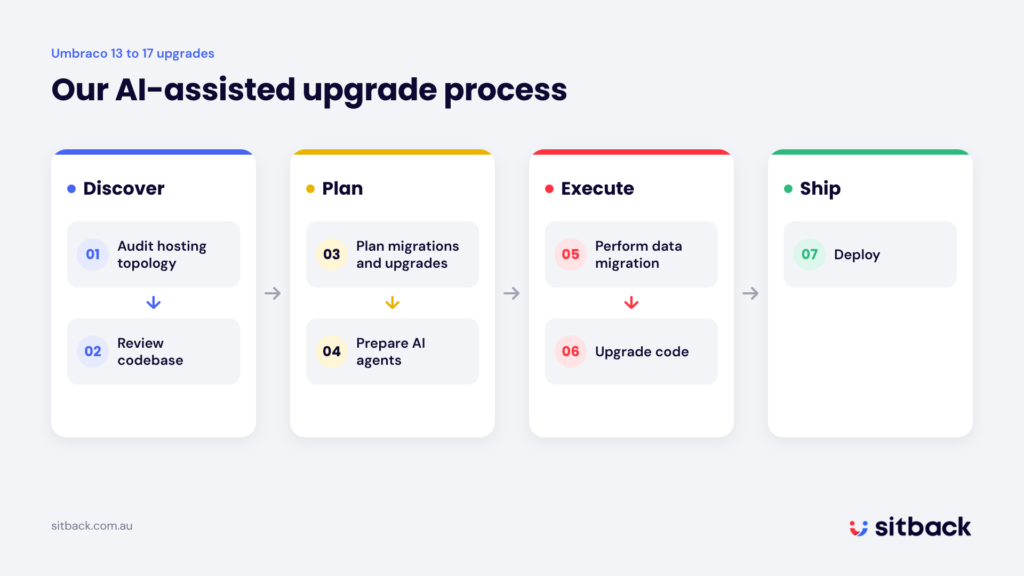
For some of our clients, that upgrade conversation is now smoother, and allows us to shape the project more effectively. This also allows us to move hosting to a more efficient Linux-based environment. This helped us to:
- Reduce hosting costs and the environmental footprint of their websites
- Provide better logging and monitoring capabilities
- Prepare our clients for upcoming AI automations, which they can add to their support & optimisation package
How it actually went
You might be asking:
- What about sensitive data? What happens to that when we use AI to migrate database contents?
- What about Umbraco Engage?
- What happens to my website’s redirects using plugins like URL Tracker or Skybrud Redirects?
At Sitback, we enforce ethical use of AI tools with our governance framework. This utilises hooks and a set of MCP (Model Context Protocol) servers that stop agents reading any data in the database, while still letting them run the migration safely.
Umbraco Engage’s schema changed between version 13 and 17, so we’ve let clients know that server-side analytics will be reset, along with personalisations. This is something we have yet to resolve, though with Umbraco HQ now owning Umbraco Engage, we are hopeful that future upgrades can persist Engage data.
Redirects were somewhat tricky. Our older framework utilised URL Tracker and our newer and more polished framework leverages Skybrud Redirects. We extracted all the redirects from URL Tracker, moved them into a spreadsheet, then imported them into Skybrud Redirects.
So what’s the verdict? We were able to:
- Achieve 100% content parity between the old site and new
- Migrate 100% of the redirects across
- Keep the look and feel identical between the old and new sites
To site visitors, the site looks the same, but to our clients, it is now secure and up to date, whilst also ready for the next Umbraco LTS version to come (version 21).
Planning your Umbraco 13 upgrade
Umbraco 13 reaches end of life on 14 December 2026, and Microsoft has already stopped releasing security updates for .NET 8, the framework it runs on. If your website is on Umbraco 13 or earlier, now is the time to map out your path to 17.
We can start with an upgrade assessment. We’ll review your customisations, packages and hosting, then give you a clear picture of the effort, risk and timing involved. If you need more breathing room, as Umbraco Partners, we can also help you weigh up Umbraco’s Extended Long-term Support as a bridge.
Get in touch with our team to discuss your options.